
Work is already spread across multiple systems: front office, operations, finance, and whatever AI platform was bought last year. That platform may do a decent job of pulling those systems together, but it sits in a separate interface, and each system has its own version of the number. Nobody sees the whole job.
It doesn’t have to work that way. AI can come into the systems where the work already happens, keeping the user’s active session and context. One view across front office, operations and finance. One ranked list of what matters next. One consistent version of the numbers everywhere. AI becomes the connective layer across the work, not another place to go. Nothing gets replaced; the work just moves between the places it already lives.
Why the AI Side Panel Gets Abandoned
Most enterprise AI is designed for one screen: a chat panel, a dashboard, a copilot in the corner. But operational work doesn’t happen on one screen. It happens in the systems people sign into every morning: front office platforms, back- and middle-office operations, ledgers and journals.
These systems of record are where transactions post, controls fire and accountability lives. They were built for doing and recording the work. They were never built to tell you which work matters most.
The AI platform beside them answers questions well enough, but it doesn’t know which record you have open, who you are in the context of the business system, or what changed overnight. So it gets opened, closed and quietly abandoned.
Three Questions Every Desk Starts With
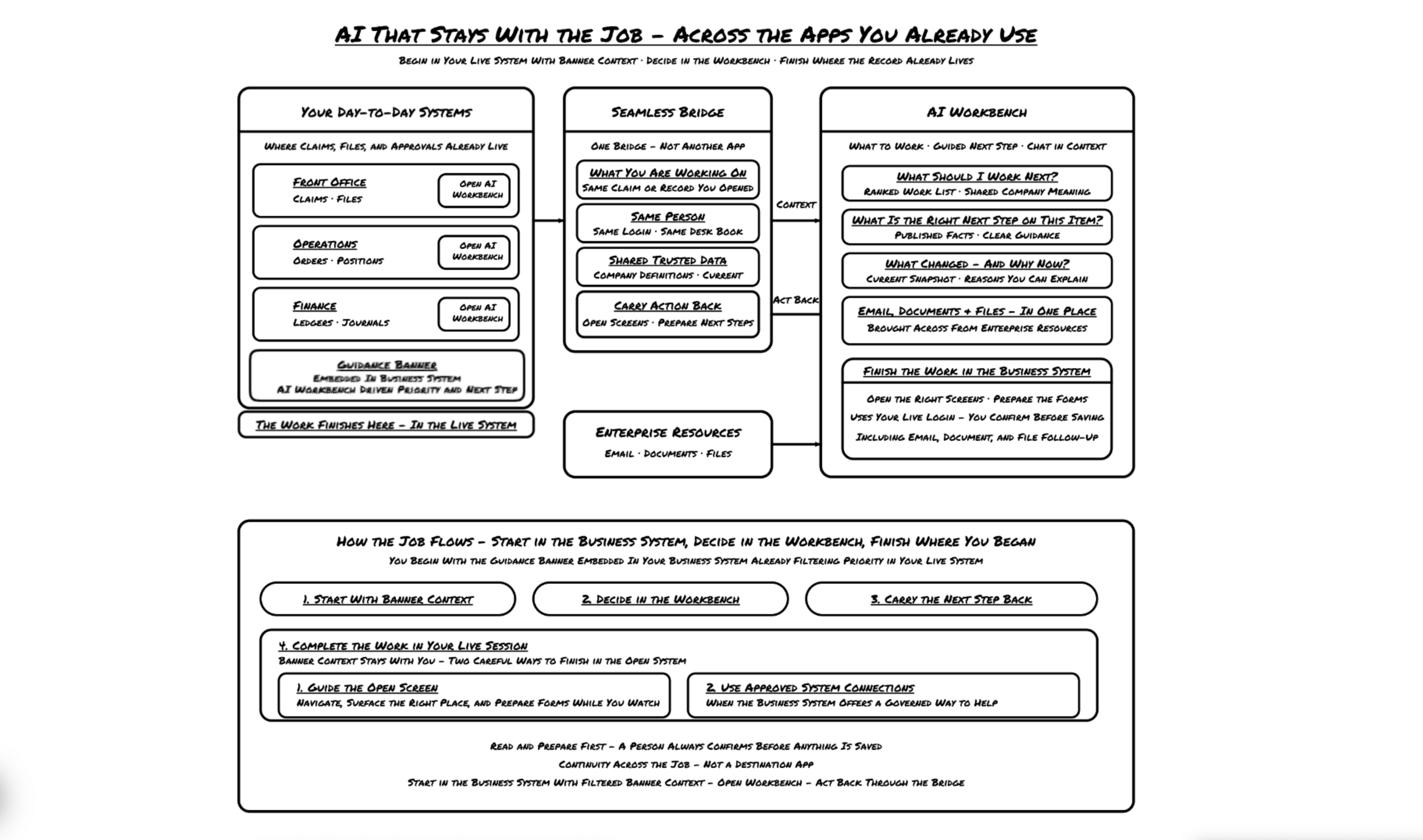
What works instead looks almost the same, but it opens inside the business system itself, already knowing the record you had open, who you are and the date you’re working from. It’s a decision surface that arrives in context and answers three questions your systems of record were never designed to answer:
What should I work on next? A ranked book of work, using your company’s own meaning of urgency.
What’s the right next step on this item? Published facts and clear guidance, not a guess.
What changed, and why does it matter now? A current snapshot, with reasons you can explain to someone else.
The Bridge Removes the Context Tax
How does AI answer those questions without becoming one more place to work? Through a bridge between the business systems and the workbench: not another app, but a banner embedded within the systems themselves.
Without it, every hop creates friction. Leave the record, log in again, paste an identifier into another screen, rebuild the context and hope both systems still mean the same thing. That’s the context tax, and every extra step makes AI harder to use and easier to abandon.
The bridge carries what you’re working on: the same record you already had open, the same person and login with no second password wall, and shared, trusted data with one meaning. The priority in the banner matches the priority in the workbench, and a label means the same thing on every item. Context, identity and unified data are the three materials enterprise AI is actually made of.
Finish the Work Where It Lives
The workbench doesn’t invent its answers. It draws on what the enterprise already has, bringing email, documents and files into one place beside the item they belong to. Priority travels back the other way, so the embedded banner shows the same ranking the workbench uses.
Then the work gets finished. The workbench opens the right screens and prepares the forms using your live login, and you confirm before anything is saved. Nothing posts on its own. The action travels back across the same bridge, and the work finishes where it always should have: in the live system, on the record, where the control fires and the audit trail already lives.
The Whole Job in Four Steps
Start with the banner already in your business system, showing what matters most today.
Decide in the workbench, which opens knowing the record, the person and the date you’re working from.
Carry the next step back across the bridge into the system where the record lives.
Finish in your live session, with the banner context still with you.
There are two careful ways to carry out that last step. The first is guidance: the workbench opens the right screen, surfaces the right place and prepares the form while you watch. The second is an approved connection, used only where the business system already offers a governed way to help. Either way, it reads and prepares first, and a person always confirms before anything is saved.
That’s the whole idea: continuity across the job, not a destination app. AI that makes people leave their work is a demo. AI that stays with the job is a product.
Watch the walkthrough: The Unified Experience: AI Workbench, a 6-minute video in our Innovation Tutorials series.
Want to explore how this could work in your organization? Start a Conversation.